FormSet 形集
返回应用目录Back to all apps

iOS · 已发布Released

FormSet 形集FormSet

双语健身训练伴侣Bilingual gym companion

在健身房现场快速找到动作、看清步骤、完成每一组,并得到下一次可执行的建议。Find an exercise, learn the movement, log every set, and get one actionable next step.

当前版本Current version v1.0 App Store 当前版本Current App Store version
最近更新Last updated 2026.08.29 首次发布First released · 2026.08
平台Platform iOS iOS 17.0 或更高版本iOS 17.0 or later
价格Price ¥15.00$1.99 已发布Released

SCREENS / 01

界面预览Screenshots

FormSet 形集
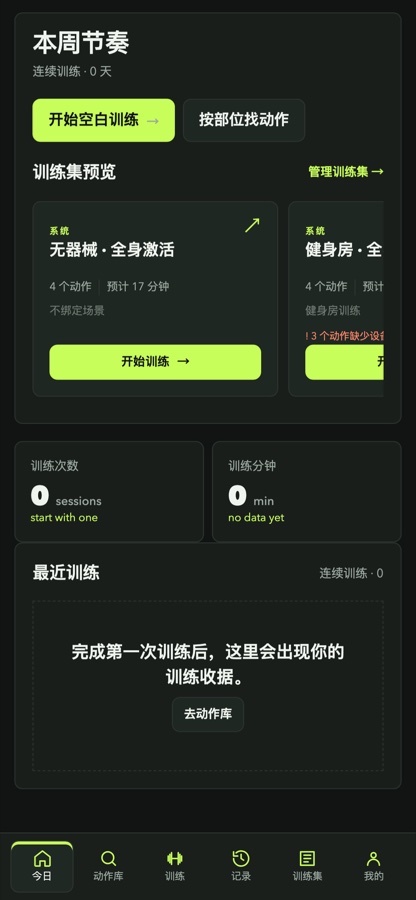
今日:本周节奏、训练集预览与最近训练Today: weekly rhythm, plan preview, and recent sessions
FormSet 形集
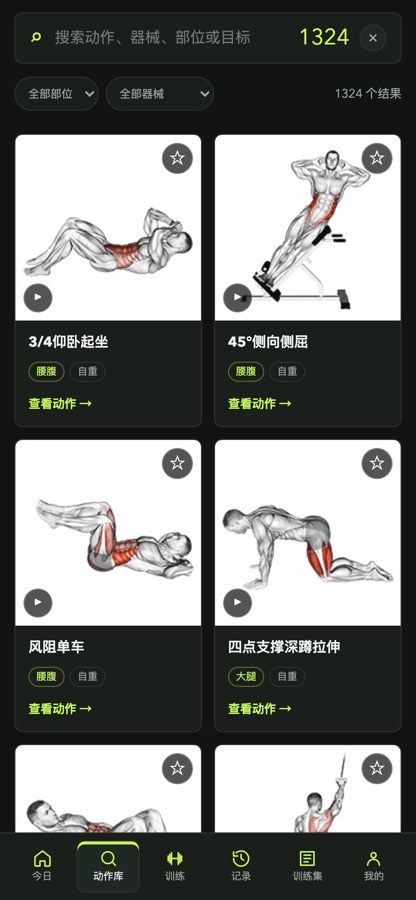
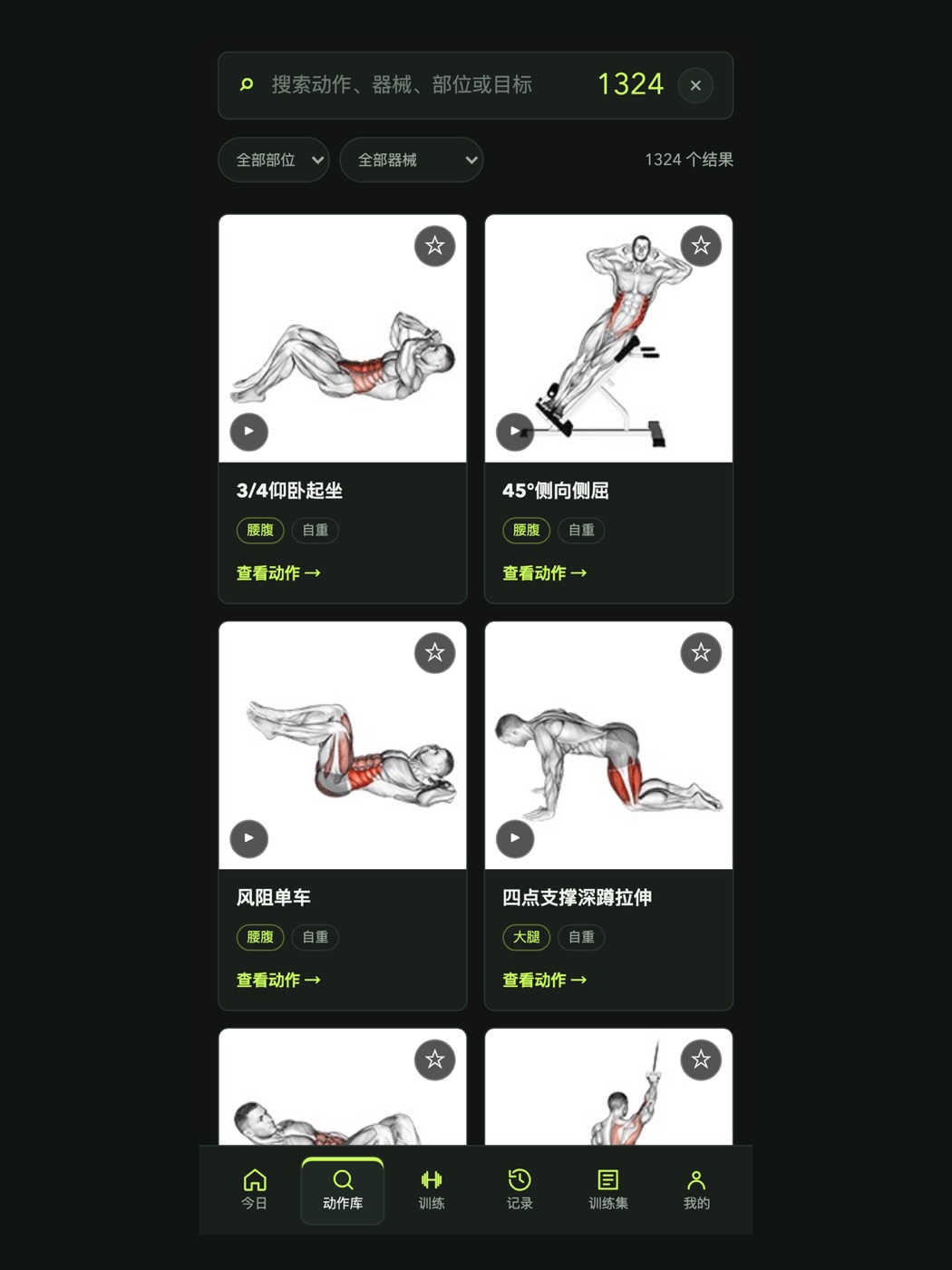
动作库:搜索并按部位、器械筛选 1,324 条动作Explore: search and filter 1,324 exercises by body part and equipment
FormSet 形集
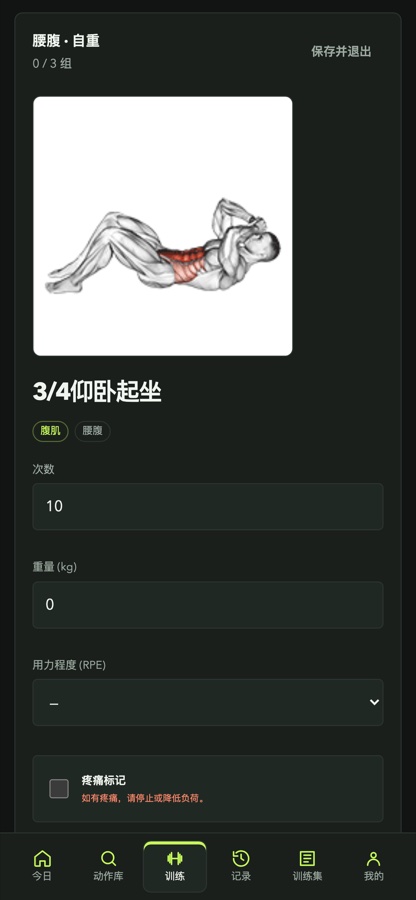
训练:逐组记录次数、重量与 RPE,并标记疼痛Workout: log reps, weight, and RPE per set, and flag pain
FormSet 形集
iPad 同样可用,界面自适应大屏Also available on iPad with a layout that adapts to the larger screen

ABOUT / 01

核心能力What it does

FormSet 形集是一款本地优先的双语健身训练伴侣,内置 1,324 条动作目录,可按目标部位、器械或关键词搜索和筛选, 并查看示范、步骤、目标肌群与安全提示。训练时记录组数、次数、重量或时长,并自动倒计时休息;完成后生成 训练收据、个人最佳与趋势。无需注册账号,训练数据默认保存在本机,离线也能继续训练。

FormSet is a local-first bilingual gym companion with a built-in catalog of 1,324 exercises. Search and filter by body part, equipment, or keyword, then review demos, steps, target muscles, and safety notes. During a workout it logs sets, reps, weight, or time with an automatic rest timer, and produces a receipt, personal bests, and trends afterward. No account is required; training data stays on your device and keeps working offline.

  • 内置 1,324 条动作,中英双语名称与步骤1,324 built-in exercises with bilingual names and steps
  • 按目标部位、器械与关键词快速筛选动作Filter exercises by body part, equipment, and keyword
  • 记录组数、次数、重量或时长,并自动倒计时休息Log sets, reps, weight, or time with an automatic rest timer
  • 训练收据、个人最佳与趋势都保存在本机Receipts, personal bests, and trends stay on your device

SETUP / 02

使用说明How to use it

  1. 01 从 App Store 安装 FormSet 形集并打开,无需注册或登录。Install FormSet from the App Store and open it; no sign-up or login is required.
  2. 02 在“今日”页选择一种开始方式:继续训练、空白训练、按部位开始、按器械开始,或直接打开一个训练集。On Today, pick a starting point: continue a workout, start blank, start by body part, start by equipment, or open a plan.
  3. 03 在“动作库”用关键词、目标部位或器械筛选动作,打开详情查看示范、步骤、目标肌群与安全提示,并可收藏或加入训练。In Explore, filter by keyword, body part, or equipment, then open an exercise for its demo, steps, target muscles, and safety notes. Favorite it or add it to a workout.
  4. 04 在“训练”页调整动作顺序、组数与目标,输入每组的次数、重量或时长;完成一组后自动进入休息倒计时,可暂停、跳过、撤销或加时。In Workout, adjust order, sets, and targets, then enter reps, weight, or time for each set. Finishing a set starts the rest timer; pause, skip, undo, or add time as needed.
  5. 05 完成训练后查看训练收据:完成动作、总组数、时长、个人最佳,以及一条基于已记录事实的下一次建议。After finishing, review the receipt: completed exercises, total sets, duration, personal bests, and one next step based on what you actually logged.
  6. 06 在“记录”页按日历回看每一次训练,并查看单个动作的历史与趋势。In History, browse past sessions on the calendar and review per-exercise history and trends.
  7. 07 在“我的”中切换界面语言与重量单位、管理通知与可选分析,并导出 JSON / CSV 或删除本机记录。In Profile, switch language and weight unit, manage notifications and optional analytics, and export JSON / CSV or delete local records.
  8. 08 动作目录与训练记录支持离线使用;重新联网后无需重新登录。The catalog and workout records work offline; no re-login is needed when you are back online.

FAQ / 03

常见问题FAQ

需要注册账号吗?Do I need an account?
不需要。首次打开即可使用全部功能,训练数据默认保存在本机。No. Every feature is available on first launch, and training data is stored on your device by default.
可以离线使用吗?Can I use it offline?
可以。动作目录和本地训练记录支持离线访问;联网只用于 App Store 更新等系统功能。Yes. The exercise catalog and local workout records work offline; the network is only used for system features such as App Store updates.
如何导出或删除我的数据?How do I export or delete my data?
进入“我的 → 数据权利”,可导出 JSON / CSV 或删除本机记录。删除操作不可撤销。Open Profile → Data rights to export JSON / CSV or delete local records. Deletion cannot be undone.
训练数据会同步到云端或 Apple 健康吗?Does my data sync to the cloud or Apple Health?
当前版本不上传训练数据,也未接入 Apple 健康;记录保存在本机,可由你自行导出。The current version does not upload training data and does not connect to Apple Health; records stay on your device and you can export them yourself.

CHANGELOG / 04

版本记录Release history

v1.02026.08.29

上架 App Store:双语动作库、训练记录、训练收据与本机数据管理。Released on the App Store: bilingual exercise catalog, workout logging, receipts, and on-device data controls.