Z2Y 目标 Support Z2Y Goals Support
Z2Y 目标 · 使用说明与支持
Z2Y 目标是一款本地优先的目标执行与习惯系统。它把足够大的目标拆成子目标与可执行的下一步行动,把行动安排到今天;习惯模块用身份认同、触发线索和两分钟版本让行为持续,并在错过之后给出恢复路径,而不是清空连续天数。应用不需要账号,不上传数据,也没有广告。
Z2Y Goals is a local-first system for executing goals and building habits. It breaks a big goal into subgoals and executable next actions and schedules them into today; the habit side keeps behavior alive with identity, cues, and a two-minute version, and offers a recovery path after a miss instead of resetting the streak. There is no account, no data upload, and no ads.
- 平台 Platform:iPhone / iPad,iOS 16.4 或更高版本
- 价格 Price:App Store ¥8.00 / $0.99
- 当前版本 Current version:2.0.0(可在应用内「设置 → 关于」核对)

快速开始
- 从 App Store 安装 Z2Y 目标并打开,无需注册或登录。
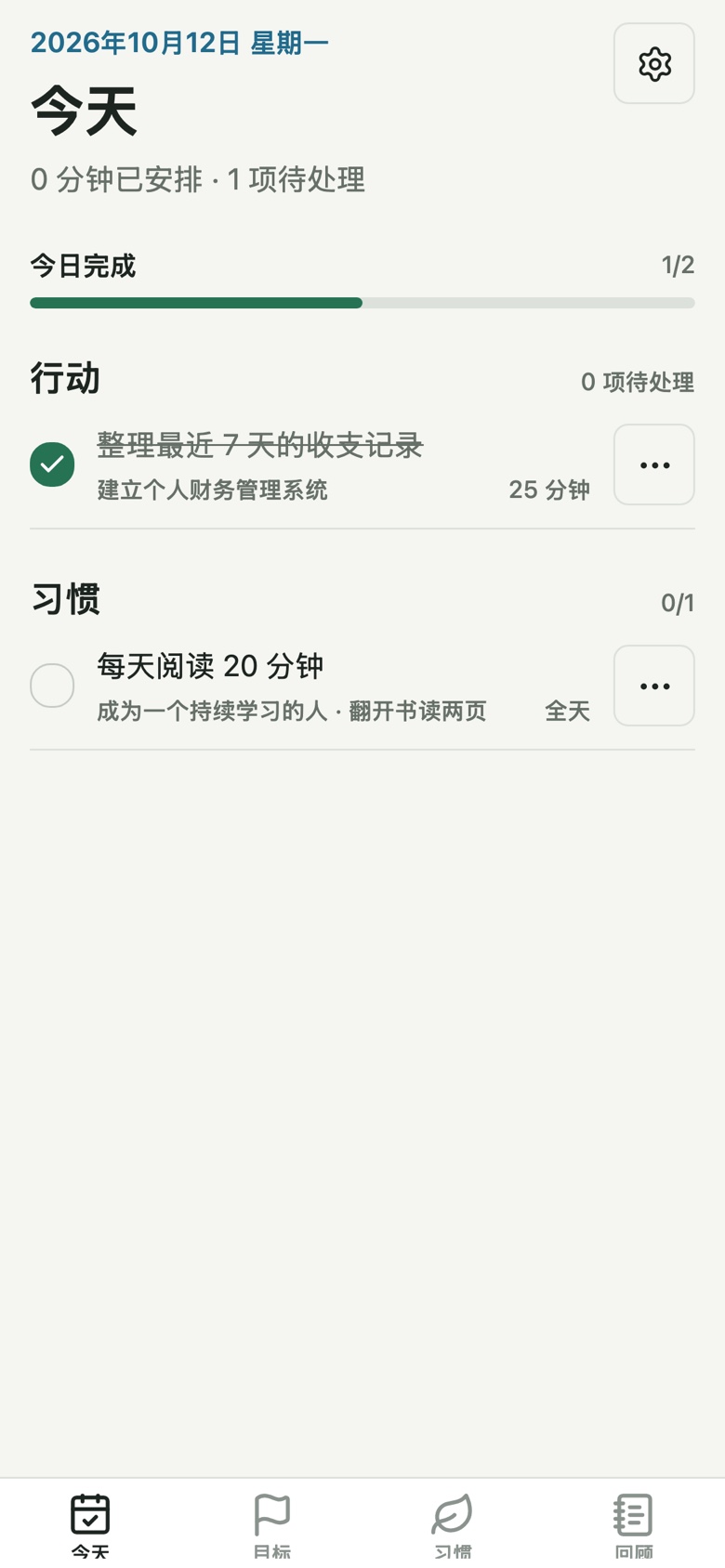
- 先看「今天」:顶部是已安排时间与待处理数量,下面是行动与习惯两组。
- 还没有内容就从这里创建:点「创建目标」走完四步向导,或点「创建习惯」走完习惯向导。
- 目标向导依次问四件事:目标结果 → 为什么重要 → 完成证据 → 第一个子目标和下一步行动,最后点「创建并安排」。
- 习惯向导依次问:身份认同(我想成为)→ 标准行为 → 两分钟版本,然后设置触发线索、地点和频率。
- 每天在「今天」勾选完成,每周打开「回顾」写下阻碍、这周学到的和下周三调整。
四个页面怎么用
今天
- 顶部一行是日期与设置入口,下面是「X 分钟已安排 · Y 项待处理」和今日完成进度。
- 行动:今天到期的目标行动,每条都带所属目标和预计时长。点前面的圆圈即完成,点右侧「…」可以改期、跳过、开始专注或打开详情。
- 习惯:今天计划发生的习惯,显示身份认同与两分钟版本;错过时可以补记,也可以主动跳过。
- 完成后进度立即更新;一次错过不会清空连续天数,历史仍然保留。
目标 · 渐进式目标
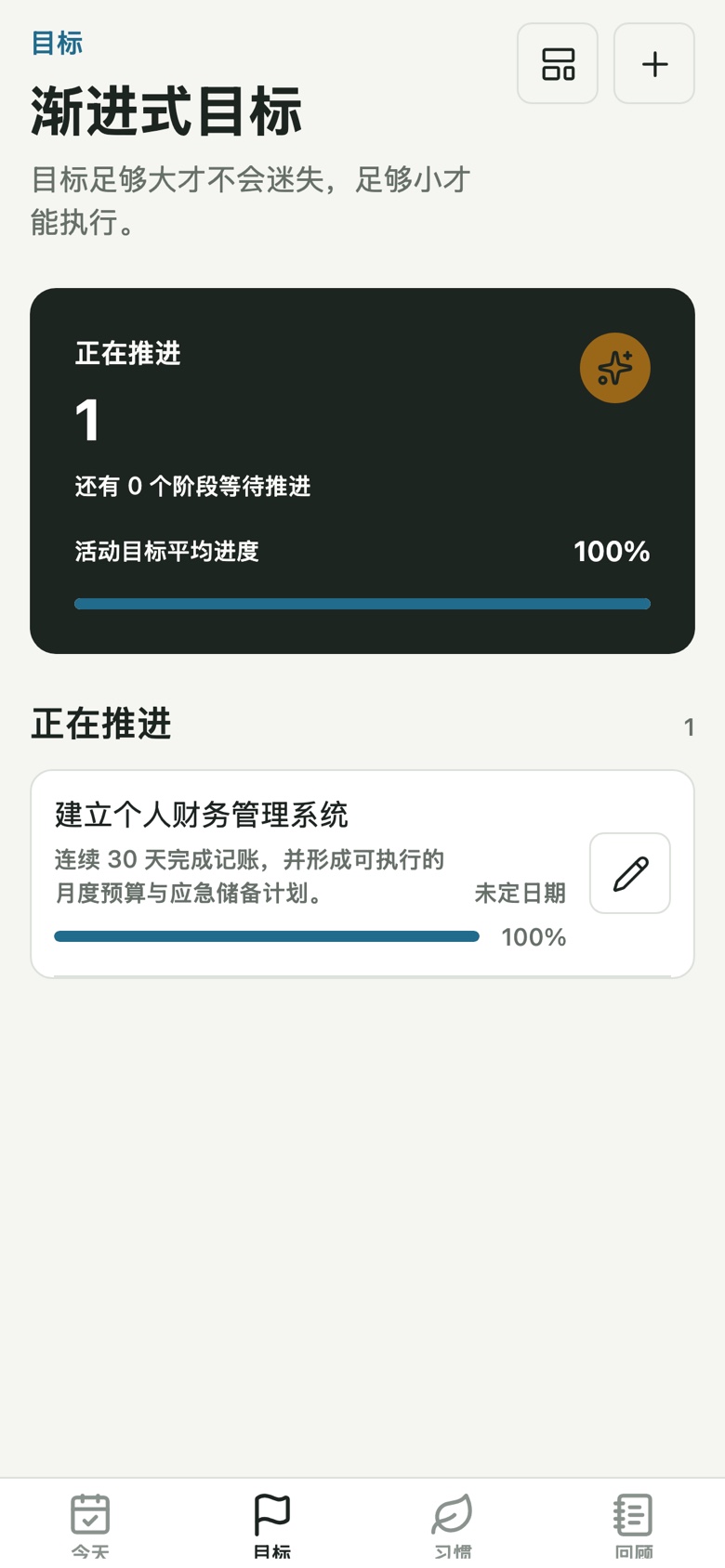
- 目标页顶部是推进总览:正在推进的目标数、还有多少阶段等待推进,以及活动目标的平均进度。
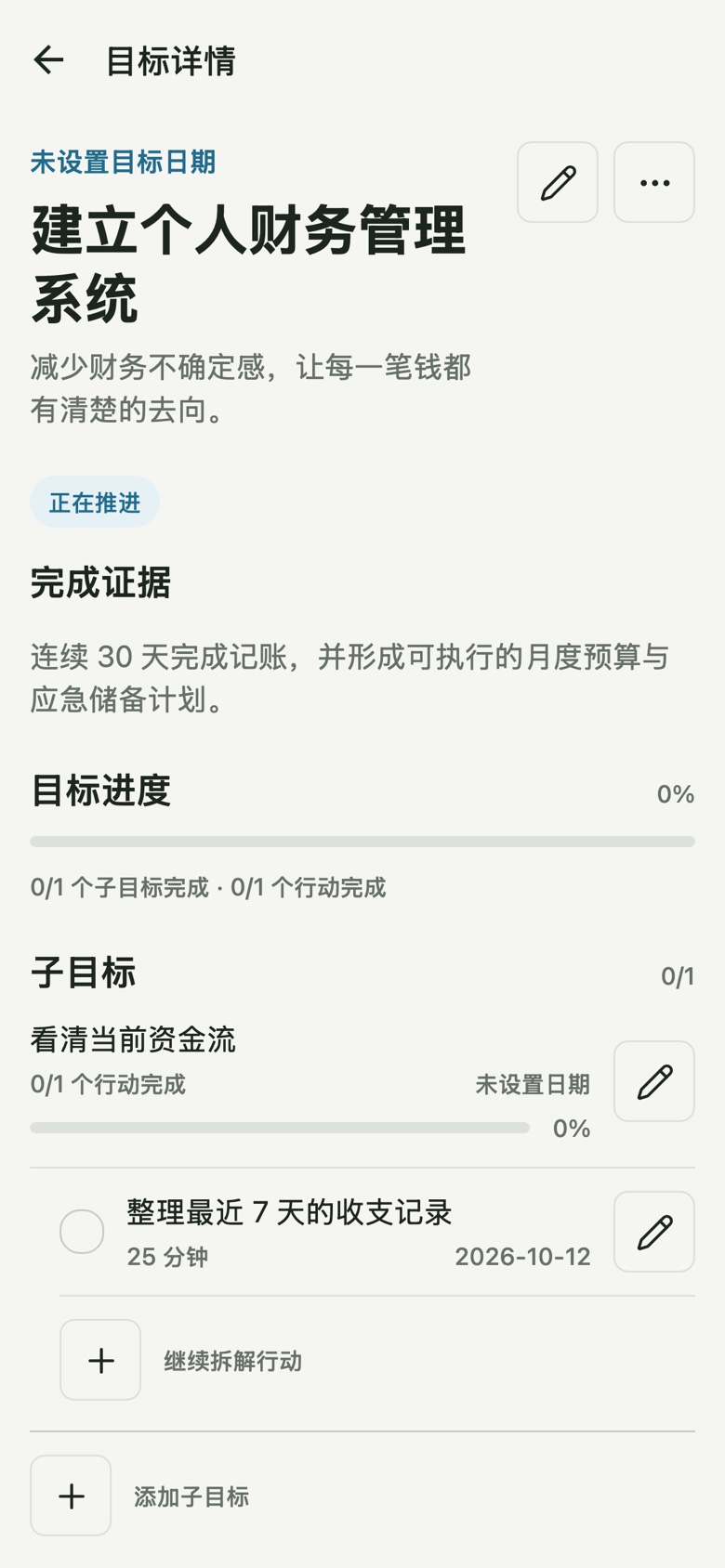
- 目标是三层的:目标 → 子目标 → 行动。子目标进度按有效行动完成比例计算,目标进度按子目标等权平均。
- 打开一个目标可以编辑目标本身、追加备注、添加子目标、继续拆解行动,也可以单独改期或完成某个行动。
- 需要反复使用的结构可以在「模板库」里自建模板;内置的 4 个默认目标模板只用于预填创建流程,保存后就是可以正常编辑和删除的普通目标。
习惯 · 习惯大师
- 习惯从身份认同开始:不写「我要完成什么」,而是写「我想成为什么样的人」,每个习惯都是对这个身份的一次投票。
- 创建时先写标准行为和它的两分钟版本(最小可执行动作),再设置触发线索、地点和频率。
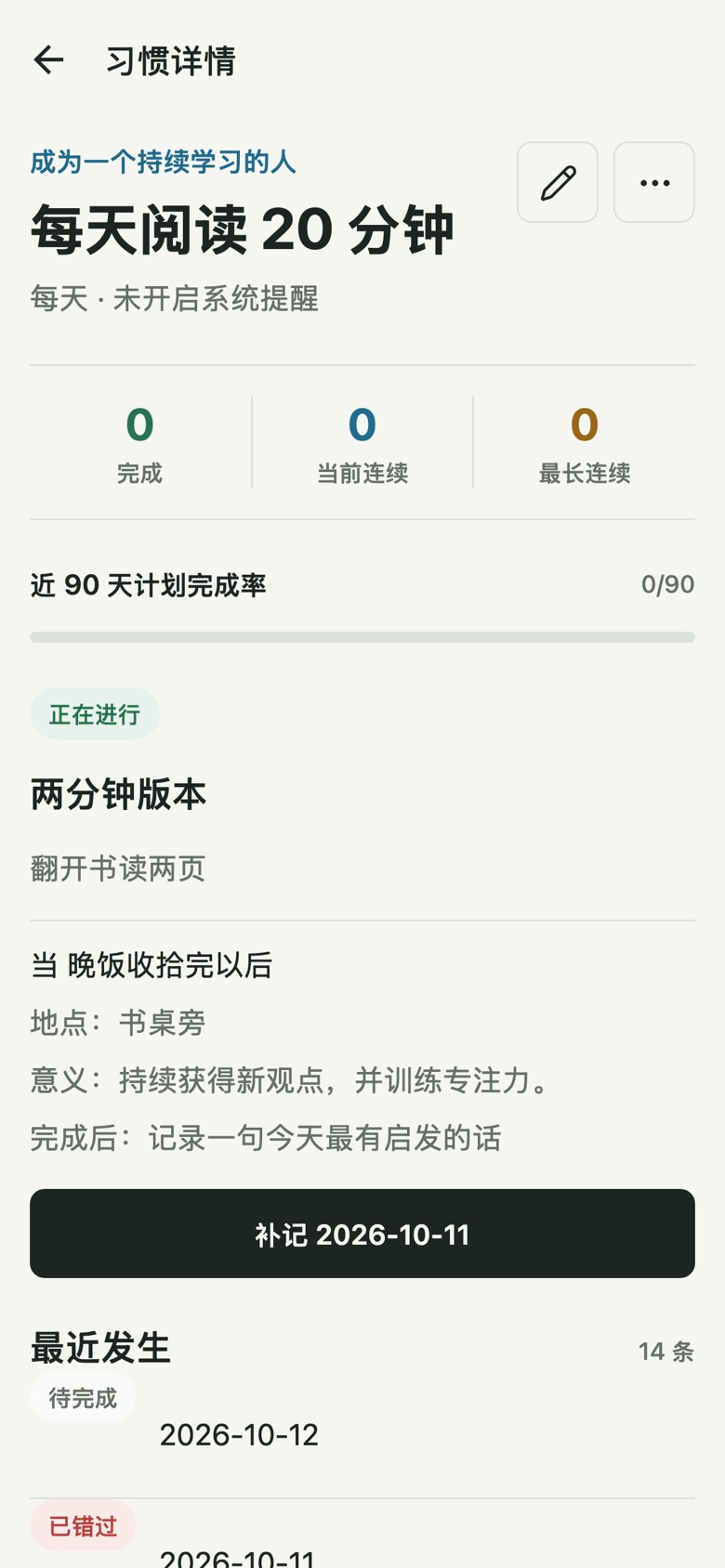
- 详情页显示完成数、当前连续、最长连续和近 90 天计划完成率,以及这条习惯的触发线索、地点、意义和即时奖励。
- 「最近发生」列出每一次计划发生和状态(待完成 / 已完成 / 已错过)。错过的可以补记,也可以主动跳过,跳过会如实计入回顾,而不是被藏起来。
- 状态菜单可以把习惯暂停或移到最近删除,历史不会被清空。
回顾
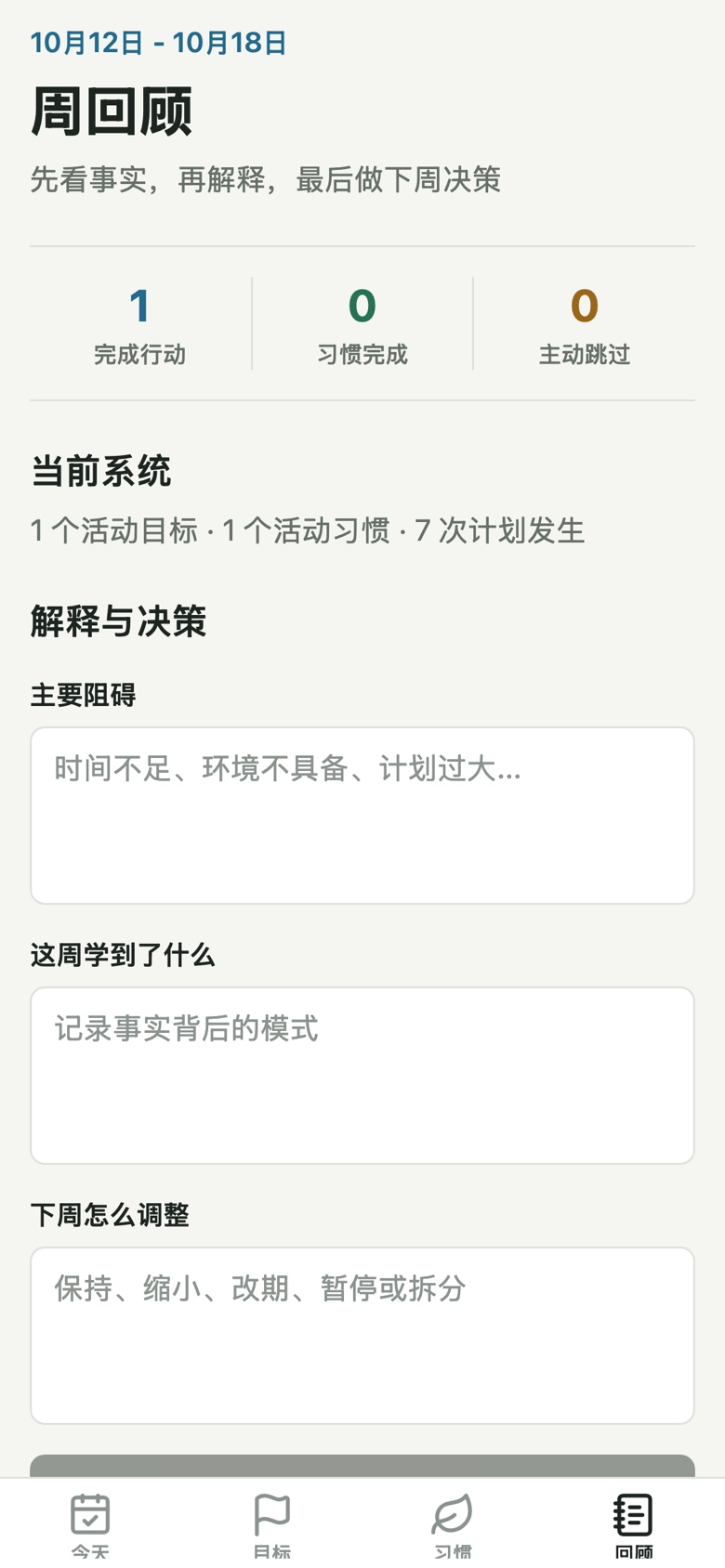
- 每周一屏:先给出完成行动、习惯完成、主动跳过三个事实数字,以及当前活动目标、活动习惯与计划发生次数。
- 然后回答三个问题:主要阻碍、这周学到了什么、下周怎么调整。
- 结论要落到具体调整(保持、缩小、改期、暂停或拆分),而不是只留下感想。
提醒、专注会话与 Widget
- 系统提醒在创建行动或习惯时可选,通知会带上上下文(来自哪个目标或习惯)以及完成、稍后、跳过和打开详情等动作。
- 提醒不承诺一定准时:专注模式、通知汇总、后台限制和系统电量策略都会影响到达时间。应用内会显示实际的通知授权与调度状态,并把无法按时送达的提醒如实标记出来。
- 专注会话从「今天」的行动菜单开始,可以暂停、继续、完成,或结束但不计完成。iOS 上会投影到实时活动,锁屏也能看到剩余时间。
- iPhone 与 iPad 的主屏 Widget 显示今天的关键信息:首要行动、下一习惯和提醒健康状态。
数据、备份与隐私
- 没有账号、没有云端同步、没有广告。目标、子目标、行动、习惯、备注、完成历史和偏好都保存在设备本地的 SQLite 数据库中。
- 「设置 → 数据与隐私」可以打开数据迁移:导出的 ZIP 里包含 manifest、schema 版本和逐文件 SHA-256 校验,也可以导入 ZIP 或旧版 JSON——导入先预览,确认后在同一个事务里写入。
- 因为不做云端同步,本机数据不会自动出现在新设备上;换设备前请先导出备份,再在新设备上导入。
- 删除 App 或清除它的存储会永久移除本机数据,且无法恢复。
常见问题
数据会在设备之间同步吗?
当前版本不上传数据,也没有账号同步。跨设备请使用「设置 → 数据与隐私」里的导出与导入。
提醒一定会准时到达吗?
不会。系统提醒受专注模式、通知汇总、后台限制与电量策略影响;应用内会显示真实的授权与调度状态,无法按时送达的提醒会被标记出来,而不是被当成已发送。
错过一天怎么办?
在「今天」或习惯详情里补记,或者主动跳过。跳过会记录为一次主动决定并计入周回顾,连续天数的历史不会被抹掉。
可以带旧版本的数据过来吗?
可以。「数据迁移」支持导入这一代的 ZIP 包,也支持旧版导出的 JSON;旧数据会先预览映射结果,确认后才写入。
支持哪些设备?
iPhone 与 iPad(iOS 16.4 或更高版本)。Android 版本尚未公开发布。
联系支持
需要帮助请发送邮件至 petterobam@gmail.com,或在 问题反馈 提交。请在邮件里注明:
- 设备型号与 iOS 版本
- 应用版本(见「设置 → 关于」)
- 复现问题的具体步骤
- 预期结果与实际结果
- 错误提示或截图
请不要发送密码、支付信息或其他敏感信息。支持请求通常会在三个工作日内处理。
Getting started
- Install Z2Y Goals from the App Store and open it. No sign-up or login is required.
- Start with Today: the header shows scheduled time and remaining items, followed by the Actions and Habits groups.
- If there is nothing yet, create it here: Create Goal walks through a four-step wizard, and Create Habit walks through the habit wizard.
- The goal wizard asks four things in order: the outcome → why it matters → the evidence of completion → the first subgoal and next action, then finishes with Create and schedule.
- The habit wizard asks for the identity you want to become, the standard behavior, and its two-minute version, then the cue, location, and frequency.
- Check things off in Today each day, and open Review each week to write down the obstacle, what you learned, and next week’s adjustment.
How the four screens work
Today
- The header holds the date and a settings entry, followed by scheduled minutes, remaining items, and today’s completion bar.
- Actions lists goal actions due today with the goal they belong to and their estimate. Tap the circle to complete it, or the “…” menu to reschedule, skip, start a focus session, or open the detail.
- Habits lists the habits planned for today with their identity and two-minute version. A missed habit can be backfilled or skipped on purpose.
- Progress updates immediately; a single miss never wipes the streak or the history behind it.
Goals · Progressive goals
- The top of the goals screen summarizes what is moving: how many goals are in progress, how many stages are still open, and the average progress of active goals.
- Goals have three levels: goal → subgoal → action. A subgoal’s progress comes from the share of its actions that are actually complete, and the goal averages its subgoals.
- Opening a goal lets you edit it, append notes, add subgoals, break down further actions, and reschedule or complete individual actions.
- Structures you reuse can become custom templates in the template library. The four built-in goal templates only prefill the creation flow; once saved they are ordinary goals you can edit or delete.
Habits · Habit Master
- Habits start from an identity: not “what do I want to finish” but “who do I want to become”. Every repetition is a vote for that identity.
- Creating one means writing the standard behavior and its two-minute version first, then the cue, location, and frequency.
- The detail screen shows completions, the current streak, the longest streak, and the 90-day planned completion rate, along with the cue, location, meaning, and immediate reward.
- Recent occurrences lists every planned occurrence and its state (pending, completed, missed). A missed one can be backfilled or deliberately skipped, and skips are reported honestly in Review instead of hidden.
- The status menu pauses a habit or moves it to recently deleted without erasing its history.
Review
- One screen per week: it starts with the facts — actions completed, habits completed, and deliberate skips — plus active goals, active habits, and planned occurrences.
- Then it asks three questions: the main obstacle, what you learned this week, and what you will adjust next week.
- The conclusion should become a concrete adjustment (keep, shrink, reschedule, pause, or split) rather than a note of how you felt.
Reminders, focus sessions, and the widget
- System reminders are optional when you create an action or habit. Each notification carries context (which goal or habit it belongs to) and actions such as complete, snooze, skip, and open.
- Reminders are not promised to arrive on time: Focus modes, notification summaries, background limits, and battery policy all affect delivery. The app shows the real permission and schedule state and marks reminders it cannot deliver on time.
- Focus sessions start from an action menu in Today and can be paused, resumed, completed, or ended without counting as complete. On iOS they project to a Live Activity, so the remaining time stays visible on the lock screen.
- The home screen widget on iPhone and iPad shows the essentials: the first action, the next habit, and reminder health.
Data, backups, and privacy
- No account, no cloud sync, no ads. Goals, subgoals, actions, habits, notes, completion history, and preferences live in a local SQLite database on your device.
- Settings → Data & privacy opens Data migration: an export is a ZIP containing a manifest, the schema version, and per-file SHA-256 hashes, and the same screen imports a ZIP or a legacy JSON export — preview first, then a single transaction writes it.
- Because there is no cloud sync, your data does not appear on a new device by itself. Export a backup before switching, then import it there.
- Deleting the app or clearing its storage removes the local data permanently.
FAQ
Does it sync across devices?
The current version uploads nothing and has no account sync. Move between devices with export and import under Settings → Data & privacy.
Will reminders always arrive on time?
No. System reminders are subject to Focus modes, notification summaries, background limits, and battery policy. The app shows the real permission and schedule state and marks reminders it could not deliver instead of treating them as sent.
What if I miss a day?
Backfill it from Today or the habit detail, or skip it on purpose. A skip is recorded as a deliberate decision and counted in the weekly review, and your streak history is not erased.
Can I bring data from the previous version?
Yes. Data migration imports this generation’s ZIP packages and legacy JSON exports; the legacy mapping is previewed before anything is written.
Which devices are supported?
iPhone and iPad running iOS 16.4 or later. The Android build is not publicly released yet.
Contact support
Email petterobam@gmail.com or file an issue at issue-zh.zero2you.tech. Please include:
- Device model and iOS version
- App version (see Settings → About)
- The exact steps that reproduce the problem
- What you expected and what happened
- The error message or a screenshot
Do not send passwords, payment details, or other sensitive information. Support requests are normally reviewed within three business days.