Z2Y 强记单词
返回应用目录Back to all apps

iOS / macOS · 已发布Released

Z2Y 强记单词Z2Y Force Remember Words

定时弹出,随手强记Timed pop-ups, steady recall

按你设定的间隔弹出单词卡,用「记住了 / 忘记了」把复习变成一天里固定的节奏。Word cards appear at the interval you set — mark them remembered or forgotten to keep recall on a fixed rhythm.

当前版本Current version v1.2.2 App Store 当前版本Current App Store version
最近更新Last updated 2026.07.23 首次发布First released · 2025.04
平台Platform iOS / macOS iOS / iPadOS 14.0 或 macOS 12.0 及更高版本iOS or iPadOS 14.0, macOS 12.0 or later
价格Price 免费Free 已发布Released

SCREENS / 01

界面预览Screenshots

Z2Y 强记单词
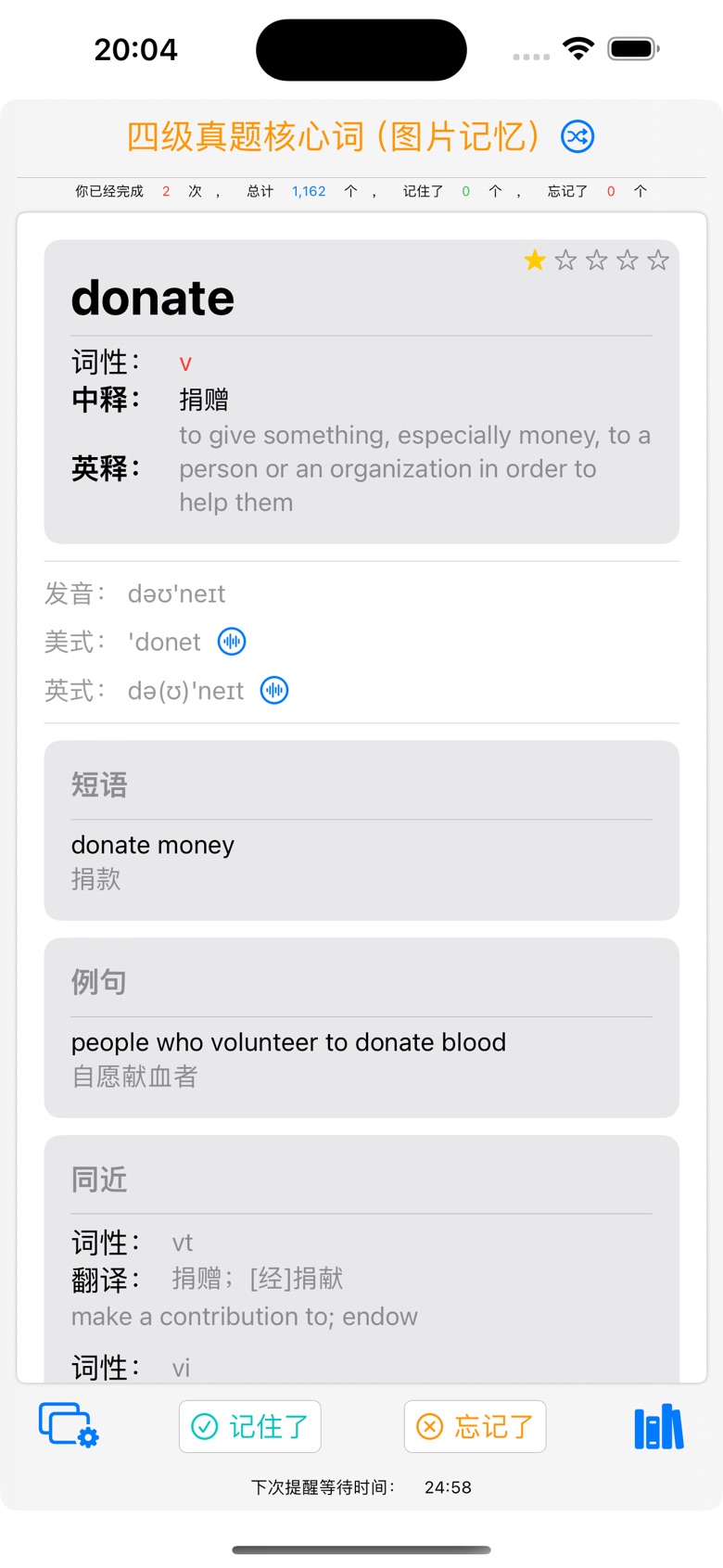
单词卡:词性、中英释义、短语、例句与同近义词都在一张卡上,读完点「记住了」或「忘记了」Word card: part of speech, definitions, phrases, examples, and synonyms on one card — then mark it remembered or forgotten
Z2Y 强记单词
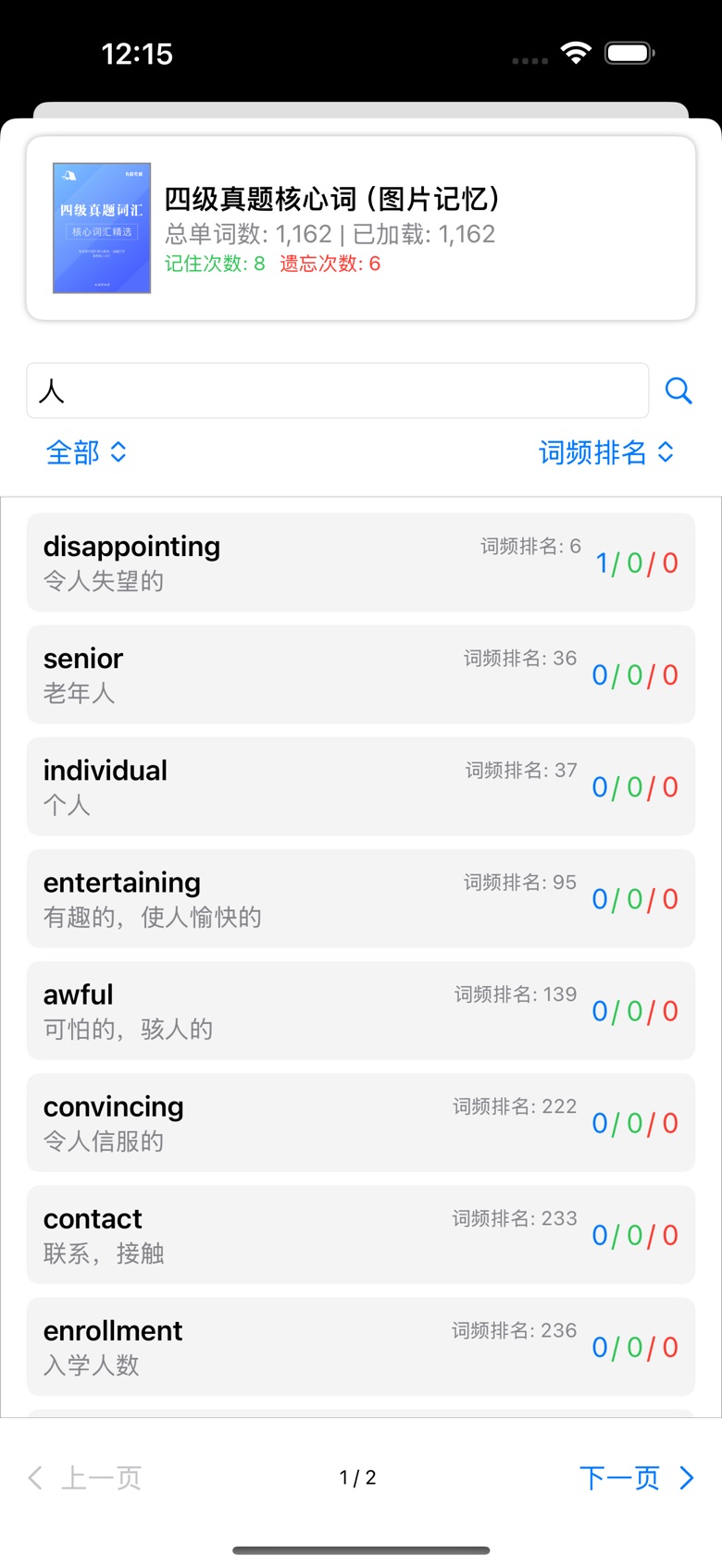
单词列表:搜索单词或释义,按词频排名排序,右侧显示每个单词的出现、记住与遗忘次数Word list: search words or meanings, sort by frequency rank, and see appeared, remembered, and forgotten counts
Z2Y 强记单词
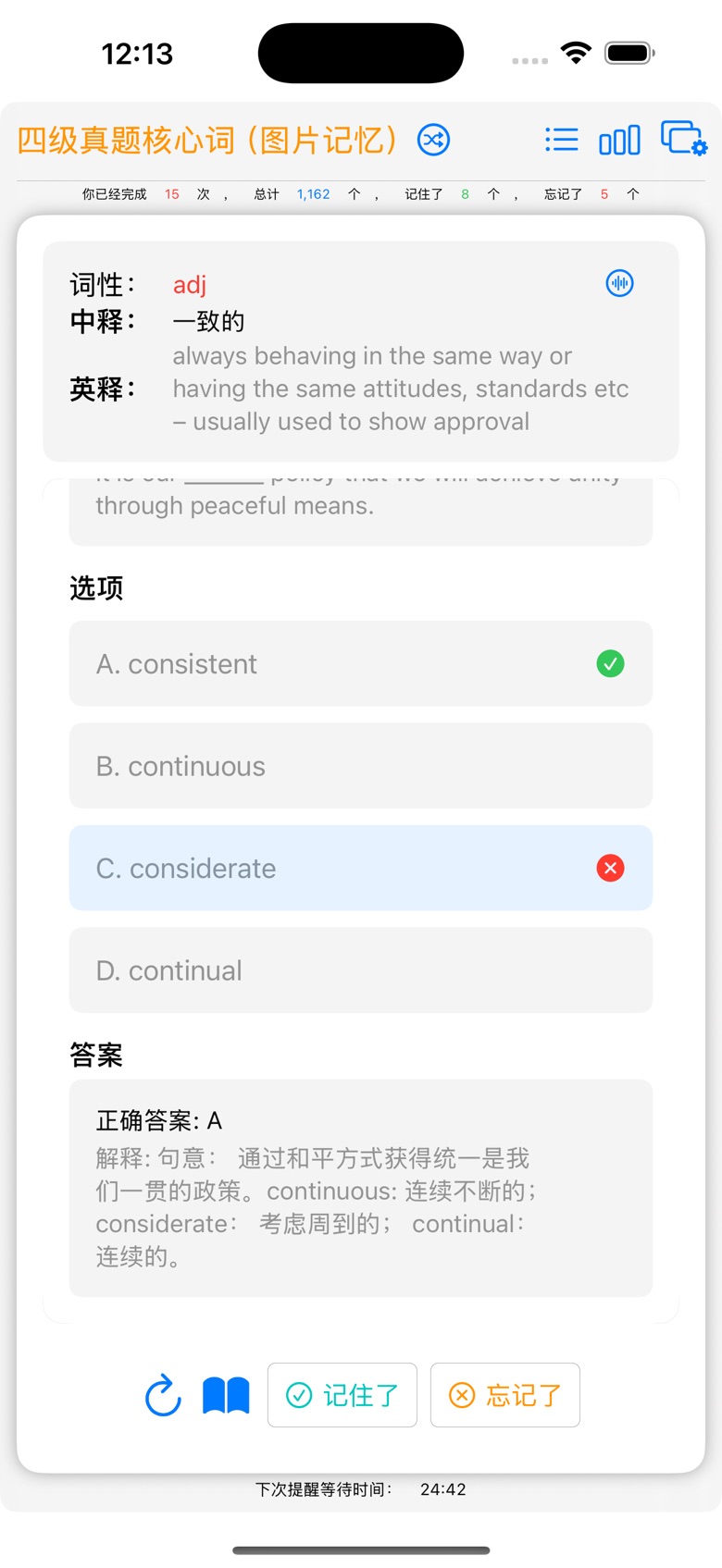
记忆检测:选择题答完后直接给出正确选项与解释Recall check: answer a multiple-choice question and see the correct option with an explanation
Z2Y 强记单词
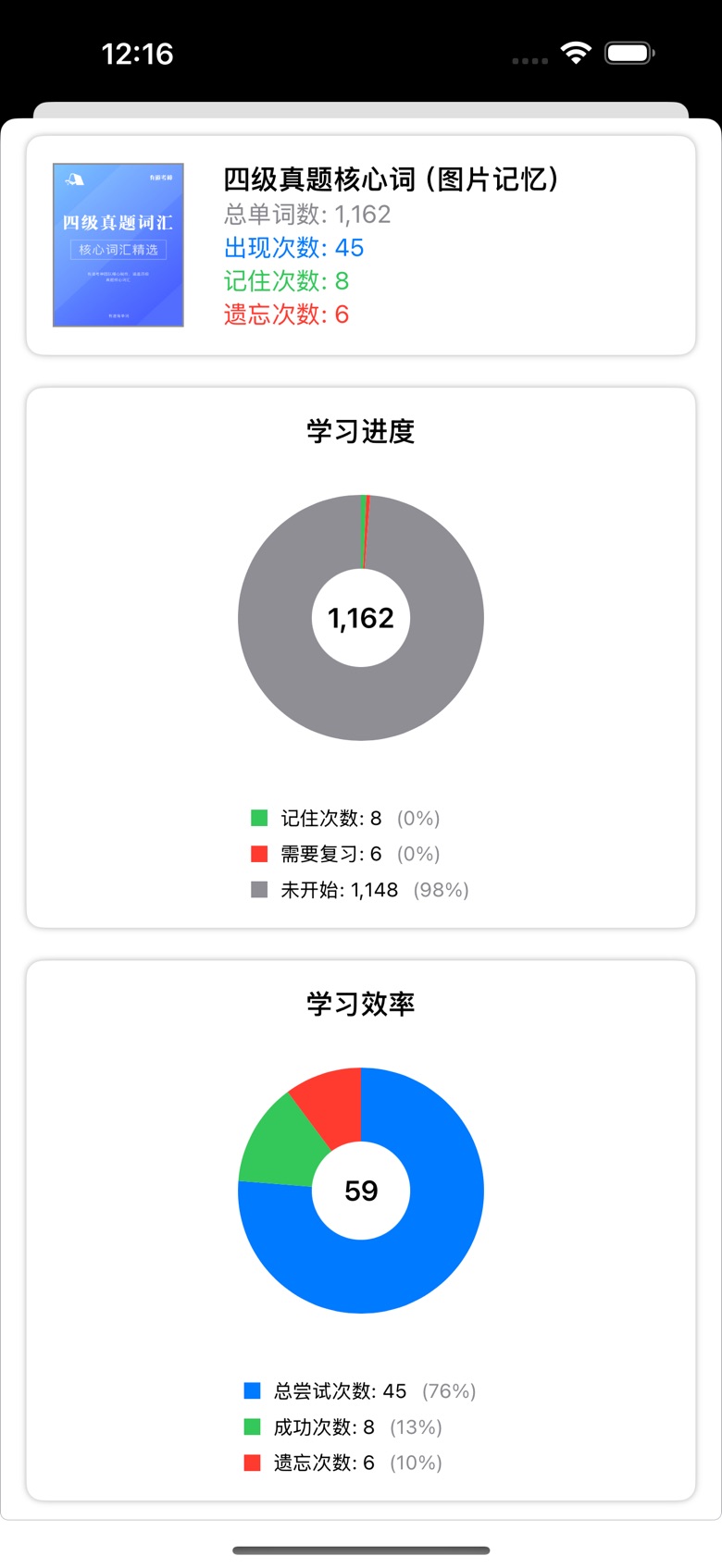
学习统计:学习进度与学习效率用环形图分出记住、需要复习与未开始的比例Study statistics: donut charts for progress and efficiency, split into remembered, needs review, and not started
Z2Y 强记单词
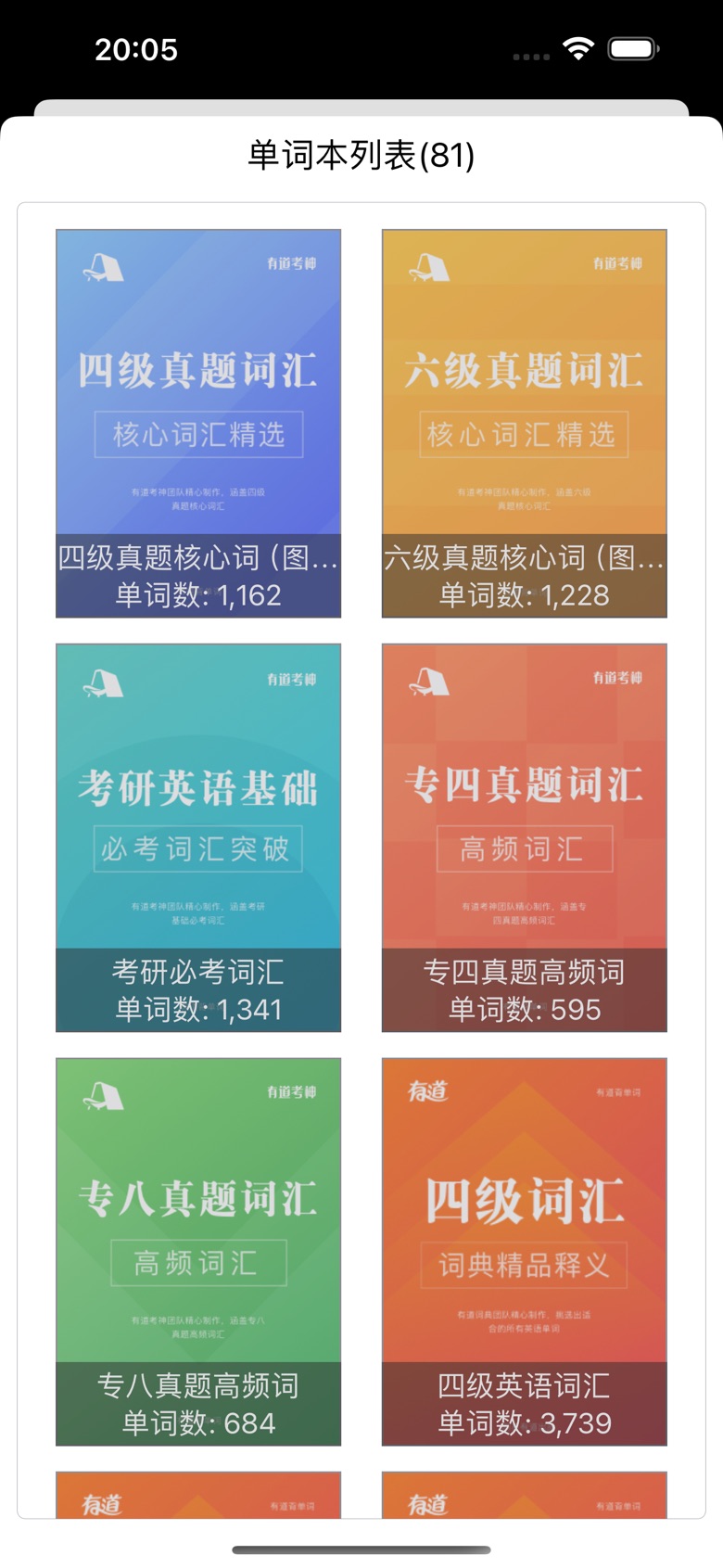
单词本列表:四级、六级、考研、专四、专八等词书,选择后加载词库开始学习Word books: CET-4, CET-6, postgraduate, TEM-4, and TEM-8 lists — pick one and start studying

ABOUT / 01

核心能力What it does

Z2Y 强记单词是一款定时弹出式单词记忆软件,iPhone、iPad 与 Mac 上都能用。它不要求你先打开学习应用,而是按你设定的间隔把一张单词卡推到眼前:词性、中英释义、音标与发音、短语、例句与真题例句、同近义词都在一起,读完点「记住了」或「忘记了」,下一次提醒重新计时,卡片下方直接显示还要等多久。词书内置四级、六级、考研、专四、专八等真题词库与词典词库;单词列表可以搜索单词或释义、按词频排名筛选,并显示每个单词的出现、记住与遗忘次数。学习统计把学习进度、学习效率和遗忘次数最多的 10 个单词画成图表,方便决定下一轮重点补哪里。提醒间隔可在 1 到 3600 秒之间调整。

Z2Y Force Remember Words is a timed pop-up vocabulary trainer for iPhone, iPad, and Mac. Instead of asking you to open a study app first, it puts a single word card in front of you at the interval you set: part of speech, Chinese and English definitions, phonetics with pronunciation, phrases, example sentences including past-exam sentences, and synonyms. Mark it Remembered or Forgotten and the next reminder starts counting down, with the waiting time shown right below the card. Built-in word books cover CET-4, CET-6, postgraduate exams, TEM-4, and TEM-8 lists along with dictionary collections. The word list searches words or meanings, filters and sorts by frequency rank, and shows how often each word appeared, was remembered, or was forgotten. Study statistics chart learning progress, learning efficiency, and the top 10 most forgotten words, so you know what to review next. The reminder interval can be adjusted between 1 and 3600 seconds.

  • 按设定的间隔弹出单词卡,1–3600 秒之间可调Word cards pop up at an interval you set, from 1 to 3600 seconds
  • 一张卡看完词性、中英释义、发音、短语、例句、真题例句与同近义词One card holds part of speech, definitions, pronunciation, phrases, examples, past-exam sentences, and synonyms
  • 内置四级、六级、考研、专四、专八等词书,可按词频排名检索Built-in CET-4, CET-6, postgraduate, and TEM word books with frequency-rank sorting
  • 选择题记忆检测会给出正确答案与解释Multiple-choice recall checks come with the correct answer and an explanation
  • 学习统计呈现进度、效率与最容易被遗忘的单词Statistics show progress, efficiency, and the words you forget most

SETUP / 02

使用说明How to use it

  1. 01 从 App Store 安装并打开,无需注册或登录。Install the app from the App Store and open it; no sign-up or login is required.
  2. 02 在单词本列表里选择一本词书,点「学习此书」开始加载(四级、六级、考研、专四、专八等)。Pick a book in the word book list and tap Learn to load it (CET-4, CET-6, postgraduate, TEM-4, TEM-8, and more).
  3. 03 在设置中调整提醒间隔(1–3600 秒),保存后按新间隔重新计时。Adjust the reminder interval in settings (1–3600 seconds); saving restarts the countdown with the new interval.
  4. 04 到点后单词卡自动出现:看完内容、播放发音,再点「记住了」或「忘记了」,卡片下方会显示下一次提醒的等待时间。When the interval is up the card appears: read it, play the pronunciation, then mark it Remembered or Forgotten — the countdown to the next reminder shows under the card.
  5. 05 到「单词列表」搜索单词或释义、按词频排名筛选,并查看每个单词的出现、记住与遗忘次数。In the word list, search words or meanings, filter and sort by frequency rank, and check each word's appeared, remembered, and forgotten counts.
  6. 06 用「做题」进行选择题记忆检测,答完查看正确答案与解释;到「学习统计」查看进度、效率与遗忘次数最多的 10 个单词。Use Do Exam for multiple-choice recall checks with answers and explanations, then open Study Statistics for progress, efficiency, and the top 10 most forgotten words.

FAQ / 03

常见问题FAQ

提醒间隔可以自己设定吗?Can I set the reminder interval myself?
可以。设置中可输入 1 到 3600 秒的间隔,保存后立即生效;单词卡下方会显示下一次提醒的等待时间。Yes. Enter any interval between 1 and 3600 seconds in settings; it takes effect right away, and the waiting time to the next reminder is shown under the card.
需要注册账号吗?Do I need an account?
不需要。应用没有账号系统,词库与学习记录都保存在本机。No. The app has no account system; word data and study records stay on your device.
发音播放不出来是什么原因?Why does pronunciation sometimes not play?
单词发音的音频来自在线词典音频接口,需要网络连接;离线时卡片上的文字内容依然可用。Pronunciation audio comes from an online dictionary audio service, so it needs a network connection; the text on the card still works offline.
在中国大陆区 App Store 搜不到?Why can't I find it on the App Store in mainland China?
该应用目前未在中国大陆区 App Store 上架,可在已上架地区(如中国香港)的 App Store 中搜索「Z2Y 强记单词」查看。The app is not currently listed on the App Store in mainland China; it is available in storefronts such as Hong Kong — search for Z2Y 强记单词 there.

CHANGELOG / 04

版本记录Release history

v1.2.22026.07.23

全新界面升级:优化词书、单词列表、学习与设置页面的视觉层级和操作体验;新增学习统计与图表,修复细节问题并提升整体稳定性。A full interface refresh: clearer hierarchy and interactions across books, word lists, study sessions, and settings, plus new study statistics and charts, detail fixes, and better stability.

v1.2.02025.06.13

新增单词列表预览与背单词统计,支持随机题库做题,并为句子和短语加入朗读。Added word list preview and study statistics, random quiz questions, and audio playback for sentences and phrases.

v1.02025.04.03

首个版本在 App Store 发布。First release on the App Store.