Z2Y 请喝水!!!
返回应用目录Back to all apps

macOS · 已发布Released

Z2Y 请喝水!!!Z2Y Drink Water!

定时喝水,强制休息Timed hydration, enforced breaks

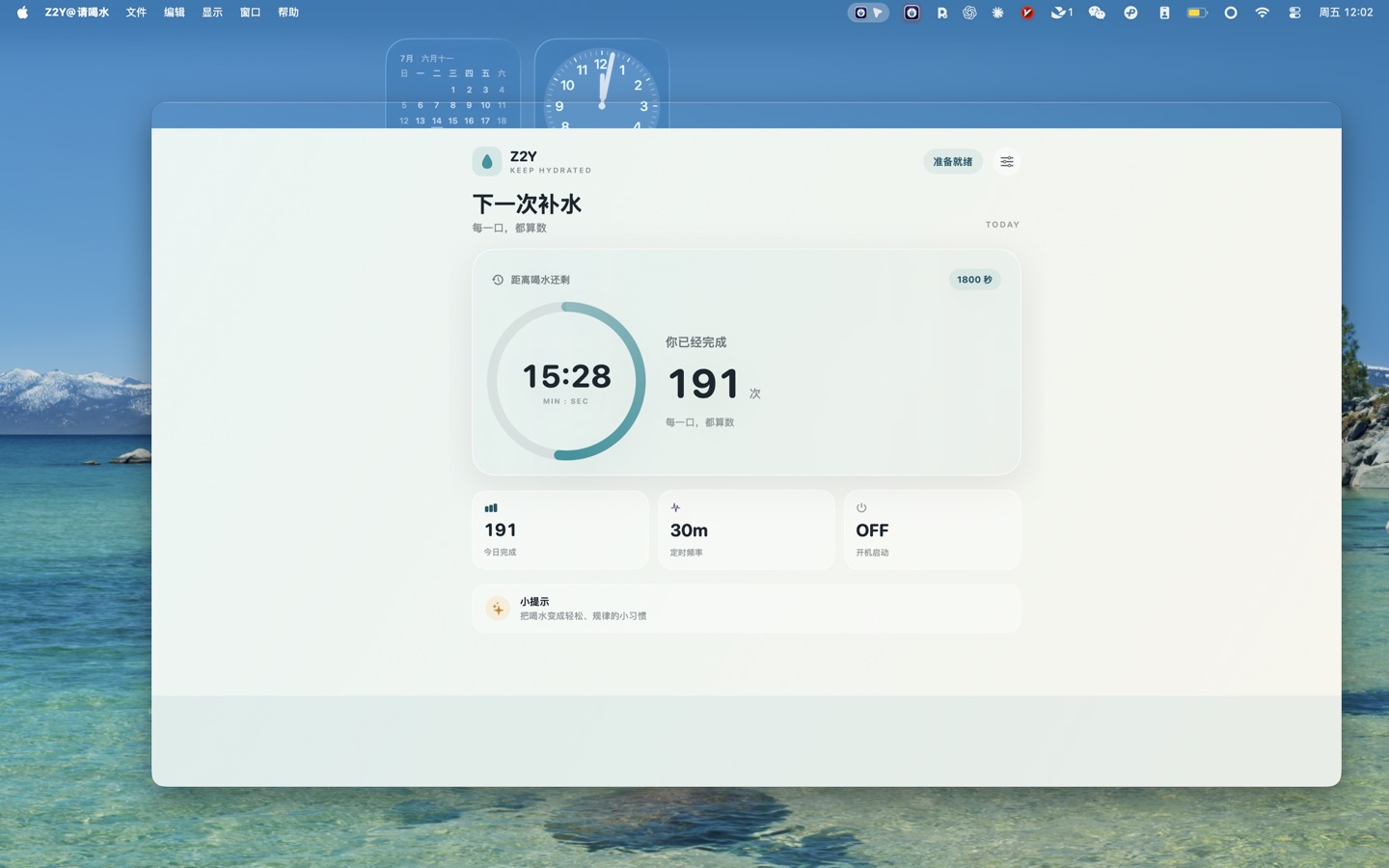
主界面用倒计时环提示距离下一次补水还剩多久,到点后由透明悬浮窗口接管屏幕,帮助长时间工作的人按时喝水、离开座位。A countdown ring shows how long is left until your next sip, and a transparent floating window takes over the screen when the time is up.

当前版本Current version v1.0.5 App Store 当前版本Current App Store version
最近更新Last updated 2026.07.24 首次发布First released · 2024.03
平台Platform macOS macOS 13.0 或更高版本macOS 13.0 or later
价格Price 免费Free 已发布Released

SCREENS / 01

界面预览Screenshots

Z2Y 请喝水!!!
主界面:倒计时环、今日完成次数与当前定时频率Dashboard: the countdown ring, today's total, and the current interval
Z2Y 请喝水!!!
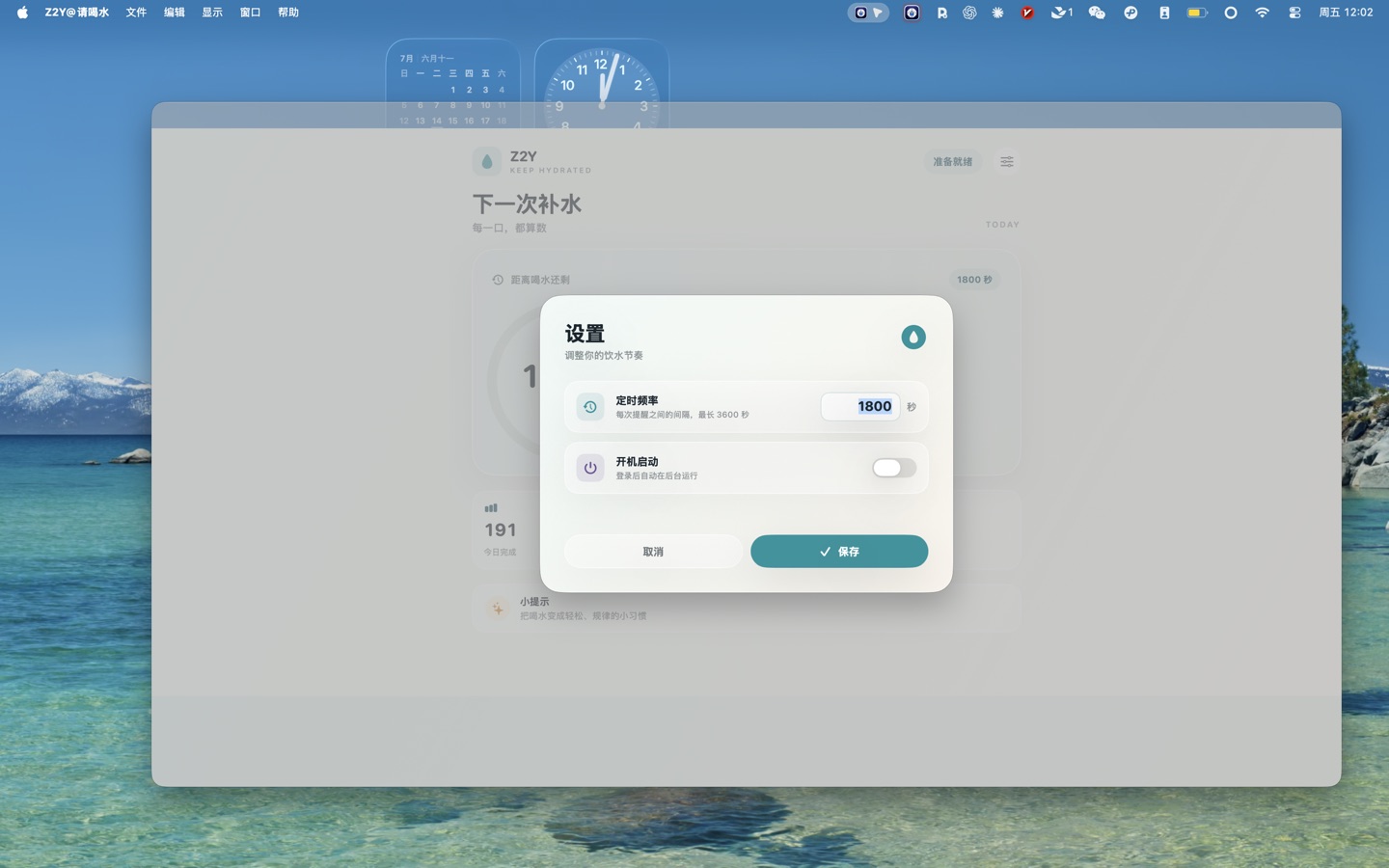
设置:提醒间隔(最长 3600 秒)与开机启动Settings: reminder interval (up to 3,600 seconds) and launch at login

ABOUT / 01

核心能力What it does

Z2Y 请喝水源于开发者自己的真实需求。1.0.5 重做了提醒界面:主界面用倒计时环显示距离下一次补水的时间,并记录今日完成次数;到点后由透明悬浮窗口接管屏幕,至少 10 秒后才能确认离开座位。提醒间隔最长可设 3600 秒,也可以打开开机启动,让它登录后安静地待在后台。

Z2Y Drink Water! began as a real personal need. The 1.0.5 dashboard was rebuilt around a countdown ring that shows the time until your next sip and keeps today's total; when the time is up, a transparent floating window takes over the screen and you must wait at least 10 seconds before you can confirm your way out of the seat. Intervals go up to 3,600 seconds, and launch at login keeps the app quietly running in the background.

  • 倒计时环显示距离下一次补水还剩多久A countdown ring shows how long until your next sip
  • 到点由透明悬浮窗口接管屏幕,至少 10 秒后才能确认A transparent floating window takes over the screen, with a 10-second wait before you can confirm
  • 提醒间隔最长可设 3600 秒,并可开机启动Intervals up to 3,600 seconds, plus launch at login
  • 记录今日完成次数,界面支持中英文Tracks today's total with a bilingual interface

SETUP / 02

使用说明How to use it

  1. 01 从 App Store 下载并安装应用。Download and install from the App Store.
  2. 02 在设置中调整提醒间隔(最长 3600 秒),并按需要打开开机启动。Set the reminder interval in Settings (up to 3,600 seconds) and enable launch at login if you want it.
  3. 03 提醒到点后,在悬浮窗口点击“我喝完了”确认,再回到工作。When the reminder appears, confirm with “I drank water” in the floating window, then get back to work.

FAQ / 03

常见问题FAQ

提醒为什么很难关闭?Why is the reminder hard to dismiss?
产品刻意用更强的提醒帮助用户离开屏幕。首次安装前请确认你能接受全屏打断。The product intentionally uses a strong interruption to pull you away from the screen. Confirm that you are comfortable with full-screen prompts before installing.
提醒间隔可以自己改吗?Can I change the reminder interval?
可以。在设置中调整定时频率,最长 3600 秒。Yes. Adjust the interval in Settings; it goes up to 3,600 seconds.
可以让它开机自动运行吗?Can it start automatically?
可以。在设置中打开开机启动,应用会在登录后自动在后台运行。Yes. Turn on launch at login in Settings and the app starts quietly in the background when you sign in.
支持哪些系统版本?Which macOS versions are supported?
macOS 13.0 或更高版本。macOS 13.0 or later.

CHANGELOG / 04

版本记录Release history

v1.0.52026.07.24

重做饮水提醒界面,新增透明悬浮窗口、倒计时进度和更清晰的设置体验;优化提醒流程与本地化显示,修复计时状态同步问题。Rebuilt the hydration reminder interface with a transparent floating window, clearer countdown progress, and a cleaner settings experience; improved the reminder flow and localization, and fixed timer state handling.