
我的macOS
返回应用目录Back to all apps

macOS · 已发布Released

我的macOSMy macOS

一个窗口管理你的 MacYour Mac, in one window

实时资源监控、应用治理、存储清理、网络足迹与系统定时任务,全部数据留在本机。Real-time system monitoring, app management, storage cleanup, network footprint, and scheduled tasks — with all data kept on your Mac.

当前版本Current version v0.1.0 GitHub 当前版本Current GitHub release
最近更新Last updated 2026.11.12 首次发布First released · 2026.11
平台Platform macOS macOS 13.0 或更高版本macOS 13.0 or later
价格Price 免费Free 已发布Released

SCREENS / 01

界面预览Screenshots

我的macOS
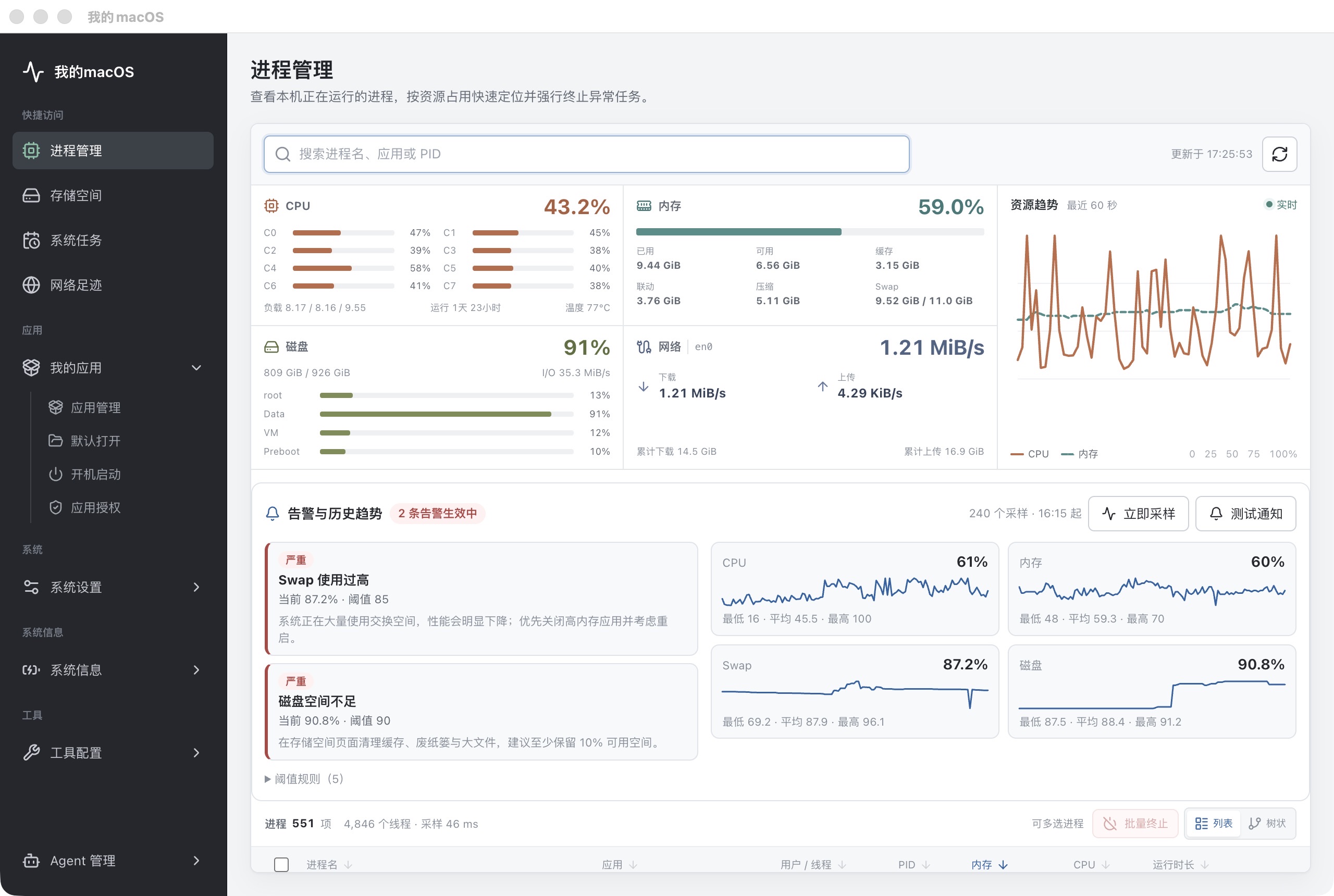
进程管理:CPU、内存、磁盘、网络与告警趋势Processes: CPU, memory, disk, network, and alert trends
我的macOS
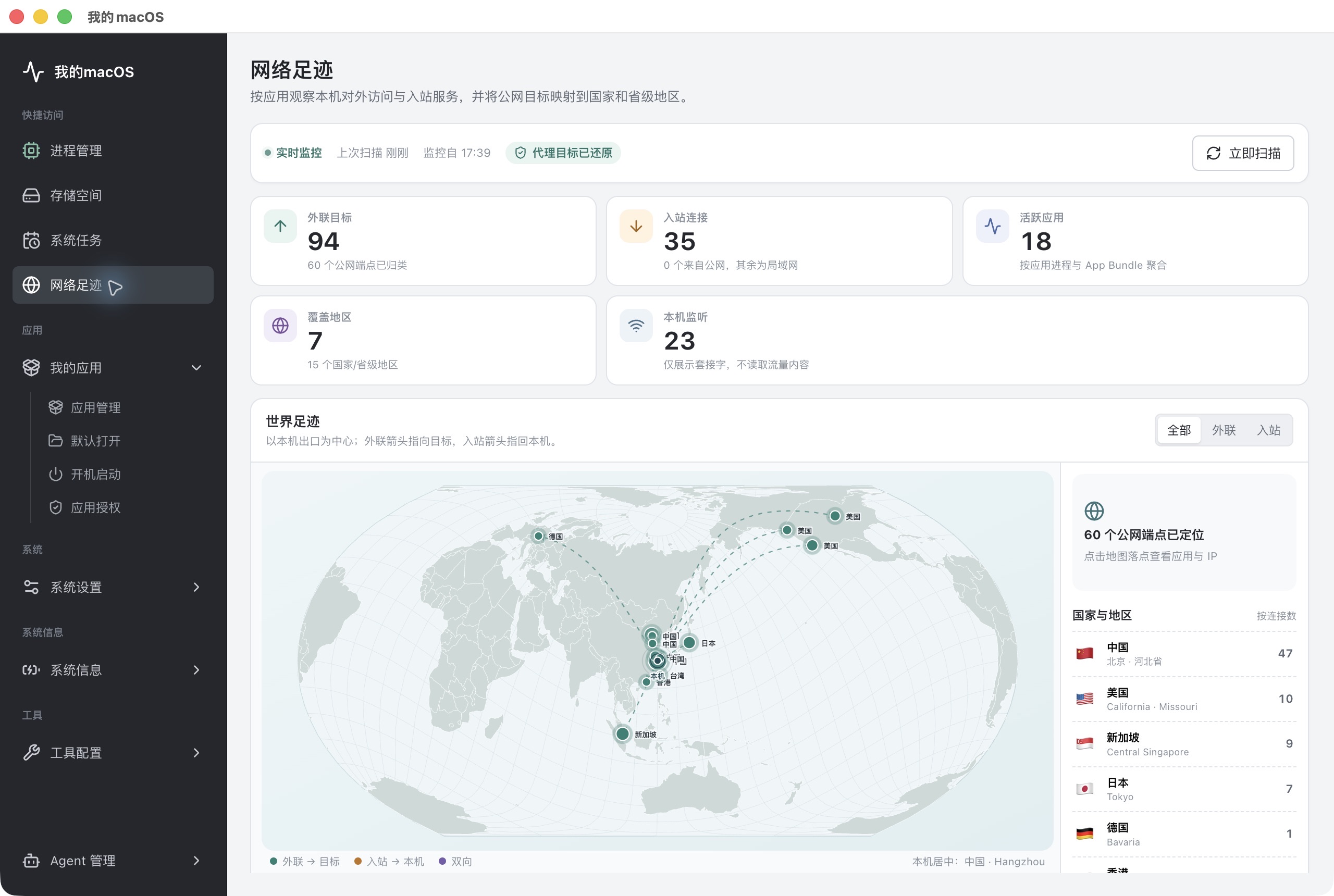
网络足迹:按应用聚合并把公网目标落在世界地图Network footprint: per-app connections on a world map
我的macOS
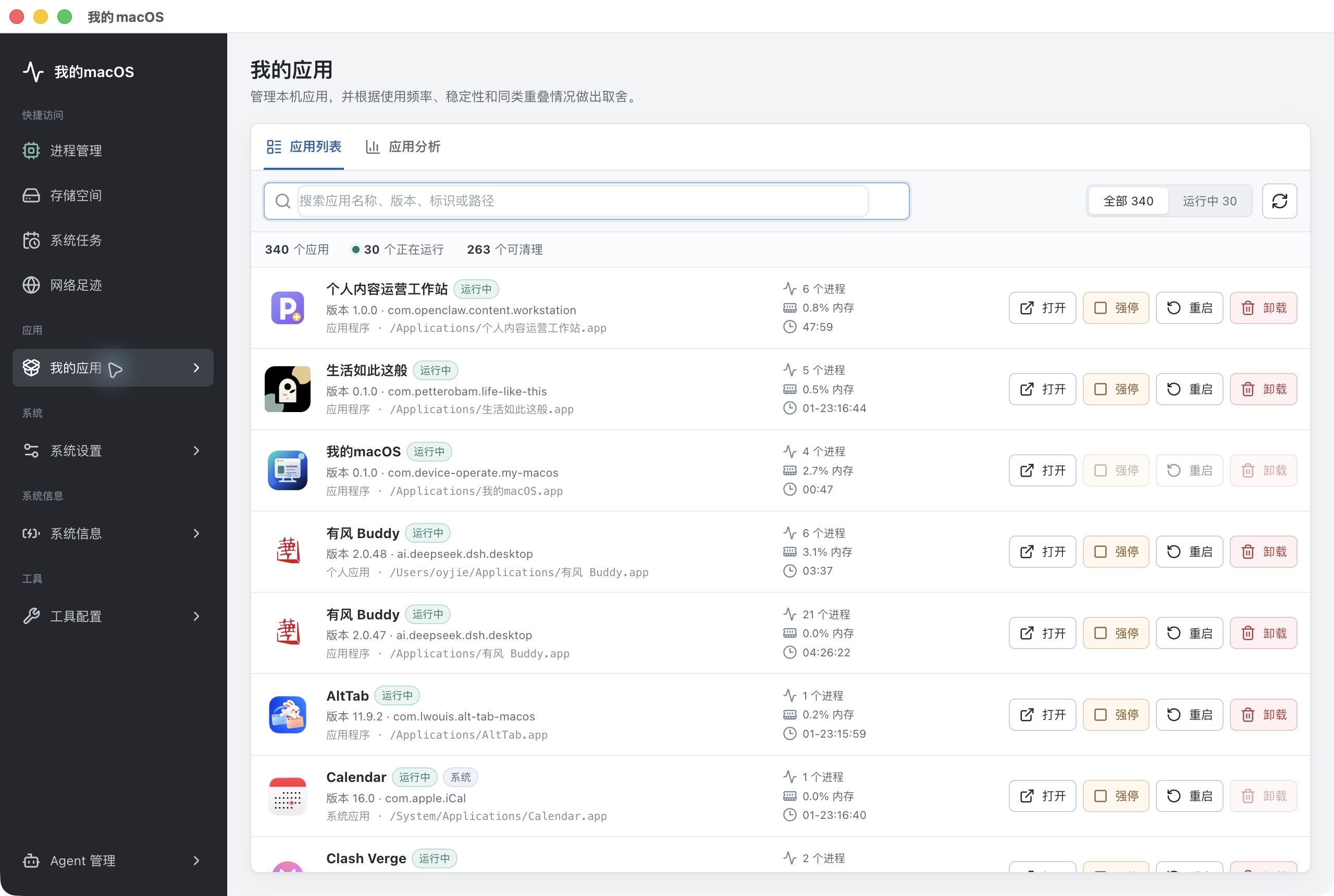
我的应用:应用清单、运行状态与一键治理My apps: inventory, running state, and one-click actions
我的macOS
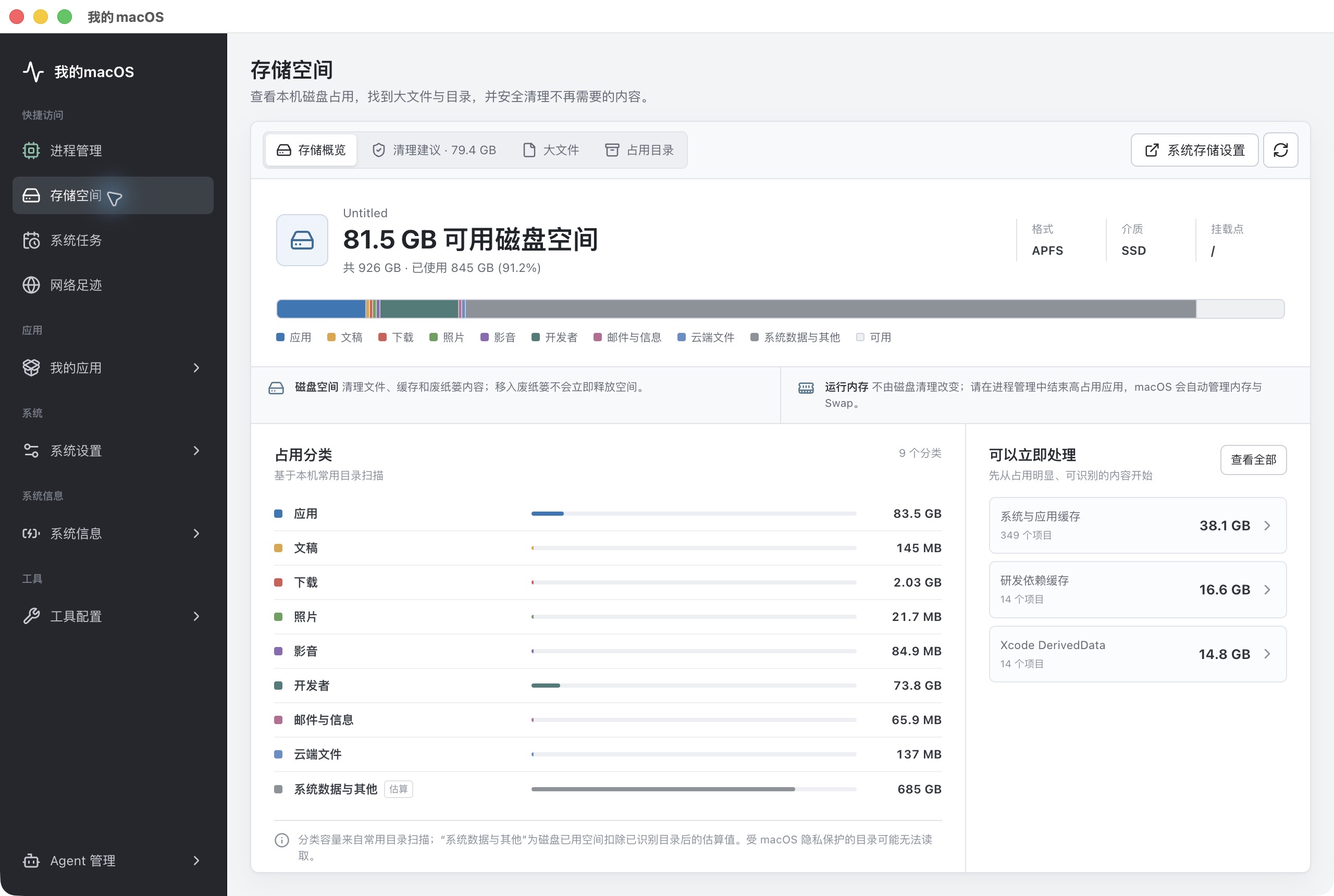
存储空间:分类占用、缓存与可清理项Storage: category usage, caches, and cleanup targets
我的macOS
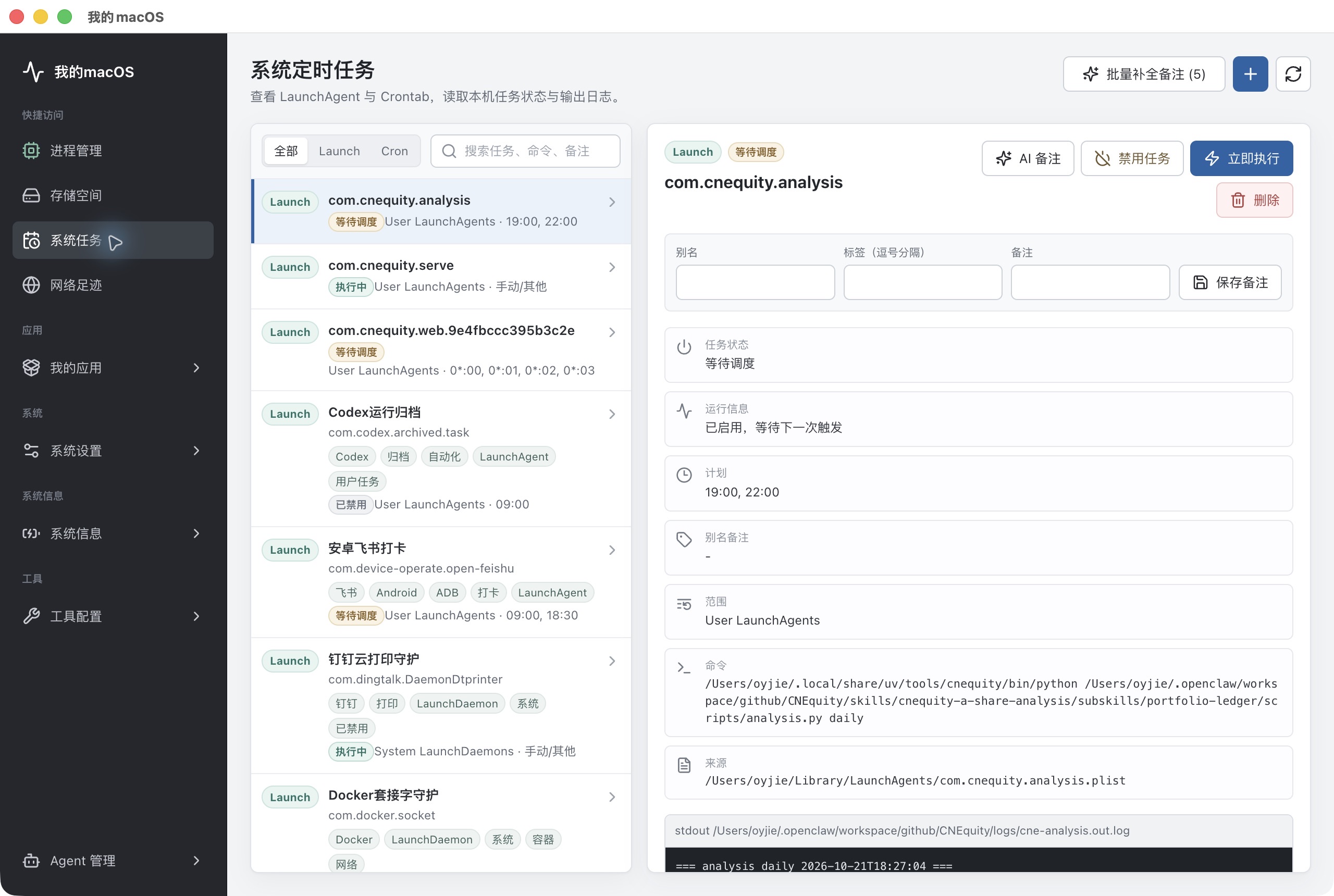
系统定时任务:LaunchAgent、LaunchDaemon 与 CrontabScheduled tasks: LaunchAgents, LaunchDaemons, and crontab

ABOUT / 01

核心能力What it does

我的macOS 把 macOS 的系统状态、应用、存储、网络与定时任务收进一个窗口。它不是另一个活动监视器:看到异常进程可以直接强停,发现大文件可以移入废纸篓,网络足迹会把每个应用的外联与入站连接落到世界地图,LaunchAgent、LaunchDaemon 与 Crontab 也能统一查看和执行。所有系统数据都在本机处理,网络足迹不读取流量内容;需要完全磁盘访问或自动化权限的功能会明确提示。

My macOS brings system health, apps, storage, network, and scheduled tasks into one window. It is more than another activity monitor: you can stop a runaway process, move large files to the Trash, map every app's outbound and inbound connections, and manage LaunchAgents, LaunchDaemons, and crontab entries in one place. All system data stays on your Mac, the network footprint never reads payloads, and features that need Full Disk Access or Automation explain the permission before you grant it.

  • 实时 CPU、内存、Swap、磁盘 I/O、网络与温度监控,支持阈值告警Real-time CPU, memory, swap, disk I/O, network, and temperature monitoring with alerts
  • 应用清单、运行状态、资源占用与打开 / 重启 / 强停 / 卸载App inventory with running state, resource usage, open, restart, force quit, and uninstall
  • 存储分类、大文件与缓存清理,确认后安全移入废纸篓Storage categories, large files, and cache cleanup with explicit confirmation
  • 按应用聚合的外联 / 入站连接与世界地图,支持 Clash/Mihomo 代理透视Per-app outbound and inbound connections on a world map, with Clash/Mihomo proxy awareness
  • LaunchAgent、LaunchDaemon 与 Crontab 统一管理,支持立即执行与日志Manage LaunchAgents, LaunchDaemons, and crontab entries with run-now and logs

SETUP / 02

使用说明How to use it

  1. 01 从 GitHub Releases 下载 My-macOS-0.1.0-arm64.dmg。Download My-macOS-0.1.0-arm64.dmg from GitHub Releases.
  2. 02 打开 DMG,把「我的macOS」拖入「应用程序」。Open the DMG and drag My macOS into Applications.
  3. 03 首次打开即可使用;应用已完成 Developer ID 签名与 Apple 公证。Open it directly; the app is Developer ID signed and notarized by Apple.
  4. 04 按需在系统设置中授予完全磁盘访问或自动化权限。Grant Full Disk Access or Automation in System Settings when you need those features.

FAQ / 03

常见问题FAQ

应用是免费的吗?Is the app free?
是。当前 0.1.0 通过 GitHub Releases 免费分发。Yes. Version 0.1.0 is distributed for free through GitHub Releases.
为什么需要完全磁盘访问?Why does it need Full Disk Access?
读取各应用的授权(TCC)状态需要该权限;不授予时,资源监控、应用列表等其余功能仍然可用。Reading per-app privacy decisions requires it; without it, monitoring, app inventory, and other features still work.
支持 Intel Mac 吗?Does it support Intel Macs?
当前 0.1.0 只提供 Apple Silicon(arm64)构建。Version 0.1.0 ships an Apple Silicon (arm64) build only.
为什么没有上架 Mac App Store?Why is it not on the Mac App Store?
Mac App Store 强制沙盒,会限制进程/套接字枚举与系统工具调用。为保证完整系统管理能力,当前通过 Developer ID 公证分发。The Mac App Store requires App Sandbox, which blocks process/socket enumeration and system tooling. It is distributed as a notarized Developer ID build to keep the full system-management feature set.

CHANGELOG / 04

版本记录Release history

v0.1.02026.11.12

首个公开版本:实时监控、应用治理、存储清理、网络足迹、系统定时任务与 SSH/工具管理;Developer ID 签名并通过 Apple 公证。First public release: real-time monitoring, app management, storage cleanup, network footprint, scheduled tasks, and SSH/tool management; Developer ID signed and notarized by Apple.